


Summary
We will see how to fill the second combo box based on first combo box selection using MVVM Data binding.
Project Structure
users.java
DepartmentDAO.java
usersDAO.java
DemoVM.java
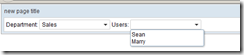
Now run demo.zul file:Output
We will see how to fill the second combo box based on first combo box selection using MVVM Data binding.
ZK Version : ZK 6
Project Name :ComboBoxTwoMVVM
Project Structure
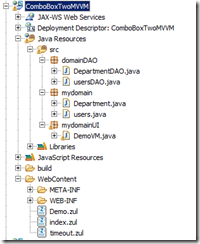
Demo.zul
1: <?page title="new page title" contentType="text/html;charset=UTF-8"?>
2: <zk> 3: <window id="myWin" title="new page title" border="normal"
4: apply="org.zkoss.bind.BindComposer"
5: viewModel="@id('myvm') @init('mydomainUI.DemoVM')">
6: 7: Department: 8: <combobox model="@load(myvm.allDepartments)"
9: selectedItem="@bind(myvm.selectedDepartment)"
10: onSelect="@command('onSelectDepartment')">
11: <template name="model" var="p1">
12: <comboitem label="@load(p1.departName)"
13: value="@load(p1.departCode)" />
14: </template> 15: </combobox> 16: 17: Users: 18: <combobox model="@load(myvm.allUsers)">
19: <template name="model" var="p1">
20: <comboitem label="@load(p1.userName)"
21: value="@load(p1.userCode)" />
22: </template> 23: </combobox> 24: 25: 26: </window> 27: </zk>
Department.java
1: package mydomain;
2: 3: public class Department {
4: 5: private String departCode;
6: private String departName;
7: 8: public String getDepartCode() {
9: return departCode;
10: } 11: public void setDepartCode(String departCode) {
12: this.departCode = departCode;
13: } 14: public String getDepartName() {
15: return departName;
16: } 17: public void setDepartName(String departName) {
18: this.departName = departName;
19: } 20: 21: }

1: <?page title="new page title" contentType="text/html;charset=UTF-8"?>
2: <zk>3: <window id="myWin" title="new page title" border="normal"
4: apply="org.zkoss.bind.BindComposer"
5: viewModel="@id('myvm') @init('mydomainUI.DemoVM')">
6: 7: Department:8: <combobox model="@load(myvm.allDepartments)"
9: selectedItem="@bind(myvm.selectedDepartment)"
10: onSelect="@command('onSelectDepartment')">
11: <template name="model" var="p1">
12: <comboitem label="@load(p1.departName)"
13: value="@load(p1.departCode)" />
14: </template> 15: </combobox> 16: 17: Users:18: <combobox model="@load(myvm.allUsers)">
19: <template name="model" var="p1">
20: <comboitem label="@load(p1.userName)"
21: value="@load(p1.userCode)" />
22: </template> 23: </combobox> 24: 25: 26: </window> 27: </zk>1: package mydomain;
2: 3: public class Department {
4: 5: private String departCode;
6: private String departName;
7: 8: public String getDepartCode() {
9: return departCode;
10: }11: public void setDepartCode(String departCode) {
12: this.departCode = departCode;
13: }14: public String getDepartName() {
15: return departName;
16: }17: public void setDepartName(String departName) {
18: this.departName = departName;
19: } 20: 21: }users.java
1: package mydomain;
2: 3: public class users {
4: 5: private String userCode;
6: private String userName;
7: private String userPassword;
8: private String active;
9: private String firstName;
10: private String lastName;
11: private String homePhone;
12: private String mobilePhone;
13: 14: public String getFirstName() {
15: return firstName;
16: } 17: 18: public void setFirstName(String firstName) {
19: this.firstName = firstName;
20: } 21: 22: public String getLastName() {
23: return lastName;
24: } 25: 26: public void setLastName(String lastName) {
27: this.lastName = lastName;
28: } 29: 30: public String getHomePhone() {
31: return homePhone;
32: } 33: 34: public void setHomePhone(String homePhone) {
35: this.homePhone = homePhone;
36: } 37: 38: public String getMobilePhone() {
39: return mobilePhone;
40: } 41: 42: public void setMobilePhone(String mobilePhone) {
43: this.mobilePhone = mobilePhone;
44: } 45: 46: public String getUserCode() {
47: return userCode;
48: } 49: 50: public void setUserCode(String userCode) {
51: this.userCode = userCode;
52: } 53: 54: public String getUserName() {
55: return userName;
56: } 57: 58: public void setUserName(String userName) {
59: this.userName = userName;
60: } 61: 62: public String getUserPassword() {
63: return userPassword;
64: } 65: 66: public void setUserPassword(String userPassword) {
67: this.userPassword = userPassword;
68: } 69: 70: public String getActive() {
71: return active;
72: } 73: 74: public void setActive(String active) {
75: this.active = active;
76: } 77: 78: }DepartmentDAO.java
1: package domainDAO;
2: import java.util.ArrayList;
3: import java.util.List;
4: import mydomain.Department;
5: 6: public class DepartmentDAO {
7: 8: public List<Department> getAllDepartments() {
9: 10: List<Department> allDepartments = new ArrayList<Department>();
11: 12: Department d1 = new Department();
13: d1.setDepartName("Finance");
14: d1.setDepartCode("D101");
15: allDepartments.add(d1); 16: 17: d1 = new Department();
18: d1.setDepartName("Sales");
19: d1.setDepartCode("D102");
20: allDepartments.add(d1); 21: 22: return allDepartments;
23: } 24: 25: }1: package domainDAO;
2: 3: import java.util.ArrayList;
4: import java.util.List;
5: import mydomain.users;
6: 7: public class usersDAO {
8: 9: public List<users> getUsers(String departMentCode) {
10: 11: if (departMentCode == "D101")
12: return getFinanceUsers();
13: 14: if (departMentCode == "D102")
15: return getSalesUsers();
16: 17: return null;
18: } 19: 20: public List<users> getFinanceUsers() {
21: 22: List<users> allUsers = new ArrayList<users>();
23: 24: users u1 = new users();
25: u1.setUserName("John");
26: u1.setUserCode("User101");
27: u1.setUserPassword("xxxxx");
28: u1.setFirstName("JohnFirstName");
29: u1.setLastName("JohnLastName");
30: u1.setHomePhone("1111111111");
31: u1.setMobilePhone("222222");
32: u1.setActive("Y");
33: allUsers.add(u1); 34: 35: u1 = new users();
36: u1.setUserName("Robert");
37: u1.setUserCode("User102");
38: u1.setUserPassword("xxxxx");
39: u1.setActive("Y");
40: u1.setFirstName("RobertFirstName");
41: u1.setLastName("RobertLastName");
42: u1.setHomePhone("53534343");
43: u1.setMobilePhone("4534343");
44: allUsers.add(u1); 45: 46: return allUsers;
47: } 48: 49: public List<users> getSalesUsers() {
50: 51: List<users> allUsers = new ArrayList<users>();
52: 53: users u1 = new users();
54: u1.setUserName("Sean");
55: u1.setUserCode("User105");
56: u1.setUserPassword("xxxxx");
57: u1.setFirstName("SeanFirstName");
58: u1.setLastName("SeanLastName");
59: u1.setHomePhone("1111111111");
60: u1.setMobilePhone("222222");
61: u1.setActive("Y");
62: allUsers.add(u1); 63: 64: u1 = new users();
65: u1.setUserName("Marry");
66: u1.setUserCode("User112");
67: u1.setUserPassword("xxxxx");
68: u1.setActive("Y");
69: u1.setFirstName("MarryFirstName");
70: u1.setLastName("MarryLastName");
71: u1.setHomePhone("53534343");
72: u1.setMobilePhone("4534343");
73: allUsers.add(u1); 74: 75: return allUsers;
76: } 77: 78: }DemoVM.java
1: package mydomainUI;
2: 3: import java.util.ArrayList;
4: import java.util.List;
5: import org.zkoss.bind.annotation.Command;
6: import org.zkoss.bind.annotation.Init;
7: import org.zkoss.bind.annotation.NotifyChange;
8: import org.zkoss.zul.Messagebox;
9: 10: import domainDAO.DepartmentDAO;
11: import domainDAO.usersDAO;
12: 13: import mydomain.Department;
14: import mydomain.users;
15: 16: public class DemoVM {
17: 18: private List<users> allUsers = new ArrayList<users>();
19: private Department selectedDepartment = new Department();
20: private List<Department> allDepartments = new ArrayList<Department>();
21: 22: public List<users> getAllUsers() {
23: return allUsers;
24: } 25: 26: public void setAllUsers(List<users> allUsers) {
27: this.allUsers = allUsers;
28: } 29: 30: public List<Department> getAllDepartments() {
31: return allDepartments;
32: } 33: 34: public void setAllDepartments(List<Department> allDepartments) {
35: this.allDepartments = allDepartments;
36: } 37: 38: public Department getSelectedDepartment() {
39: return selectedDepartment;
40: } 41: 42: public void setSelectedDepartment(Department selectedDepartment) {
43: this.selectedDepartment = selectedDepartment;
44: } 45: 46: @Init47: public void initSetup() {
48: // Load the department first
49: allDepartments = new DepartmentDAO().getAllDepartments();
50: 51: } 52: 53: @Command54: @NotifyChange("allUsers")
55: public void onSelectDepartment()
56: {57: allUsers = new usersDAO().getUsers(selectedDepartment.getDepartCode());
58: } 59: }Now run demo.zul file:Output


0 comments:
Post a Comment